
TechAIGadgetsA week with RTX Spark: everything we’ve learned using Nvidia’s new laptopsNvidia’s new Arm-based laptop chip is an exciting new challenger, but exclusively for the high-end.If you buy something from a link, The Verge may earn a commission. See our ethics statement.by Antonio G. Di Benedetto, Sean Hollister, and Tom WarrenOct 16, 2026, 3:00 PM UTCShareGiftIf you buy something from a link, The Verge may earn a commission. See our ethics statement.Nvidia’s new SoC is available in Windows laptops from six different manufacturers.
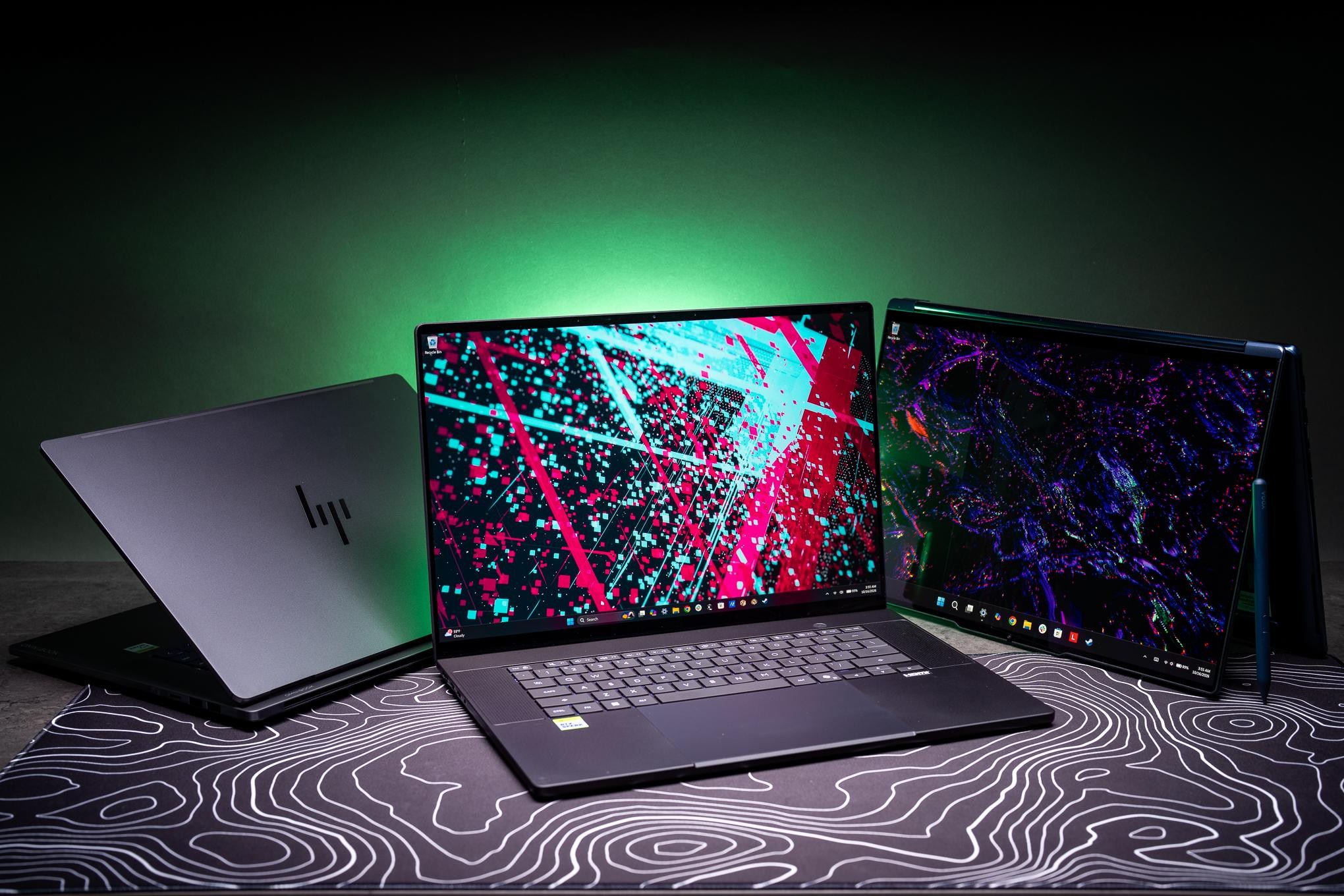
We’ve collectively tested four of them so far. | Photo: Antonio G. Di Benedetto / The VergeNvidia’s RTX Spark N1X processor is finally here, and we’ve been collectively testing a small fortune’s worth of powerful laptops sporting this new “superchip.” RTX Spark is designed to be a high-performing Arm-based SoC for laptops and small desktop computers, rivaling the best from Apple, Intel, AMD, and Qualcomm. It has loads of cores, Nvidia RTX Blackwell graphics, and enough power and unified memory to run sizable local AI models.The flagship placement is inside Microsoft’s Surface Laptop Ultra with a staggering 128GB of unified memory, which our own Tom Warren fully reviewed. Sean Hollister has been testing a 64GB version of the Asus ProArt P16, which I’ve also been testing in its top-spec 128GB config.
Since I’m the most spoiled of the lot, I also have a 64GB Lenovo Yoga 9n 2-in-1 and a 32GB HP OmniBook Ultra in for testing.All of these laptops have the same N1X chip with 20 CPU cores and 6,144 GPU CUDA cores, and they’re all wildly expensive — ranging from the HP OmniBook at $3,199.99 to the Asus ProArt’s $6,999.99. There’s an 18-core / 5,120 CUDA N1X chip in lower cost configs, but that only gets as cheap as $2,599.99 for a Surface Laptop Ultra or a smaller Asus ProArt P14 with 24GB of RAM.These are big and expensive laptops built on new chips. They’re meant for developers, coders, and content creators who might also want the ability to use local AI and even play games using the latest Nvidia tech like DLSS 5. There’s a lot to test, and we have not had a ton of time to test it all.
So below you won’t find an exhaustive scored review of any one laptop, but instead our impressions and thoughts from three writers using five laptops for a week.Is Nvidia’s “superchip” really all that super? Are Apple, Intel, AMD, and Qualcomm officially on notice? Have any of us gotten any sleep?A laptop costing $7,000 better just work, and work well. Photo: Antonio G.
Di Benedetto / The VergeAntonio Di Benedetto: Windows on Arm is no longer a wholly subpar experience like it was a few years ago. Thanks in large part to the push around Qualcomm’s Snapdragon X chips, lots of development has been put into native Arm-based apps for Windows. And many x86 apps work fine via Microsoft’s Prism emulation layer.Adobe has had native Arm versions of Photoshop and Premiere for some time now, and even though my precious Lightroom Classic is still an x86-based app I don’t notice any issues using it on Arm. At this point, you’ve gotta be relying on specialized software that’s exclusively x86 based for Windows on Arm to be a non-starter — or you want to freely play any games out there without any worry of incompatibilities.Sean Hollister: Every so often, there’s that moment when an app takes longer to load than it should, and I wonder whether it’ll load at all.
Even then, it typically loads. Occasionally, it takes more than one try. My Evernote notes disappeared a few times one day when I alt-tabbed away, but a force refresh fixed that. And apps don’t seem to respect my system preference for dark mode.But I largely agree with Antonio.
I made an RTX Spark my daily driver, with all my typical work and personal apps — Signal, Discord, Audacity, CapCut and Evernote, Irfanview, Slack, ScreenToGif and more — and nothing has failed me so far. I never once needed to think whether I was running an Arm or an x86 app. The real hitches came with gaming and AI, as you’ll read below.Tom Warren: I’ve been using a Windows on Arm laptop with a Qualcomm chip daily for the past two years and things have improved to the point that I can’t tell if an app is native or not anymore. That’s the same story on the RTX Spark laptops, and I feel like Nvidia’s entry into this category will only improve the story for creative apps and gaming.Gears of War: E-Day running on the Surface Laptop Ultra during a Microsoft demo.
Photo: Meron MenghistabTW: Windows on Arm never looked like a serious gaming platform before now. While there still aren’t many native Arm games, Nvidia’s GPU helps bruteforce through the emulation layer. Your mileage in gaming is going to vary depending on the title, but for the most part I’ve found that medium settings, running at 1440p and DLSS performance, will get you to a stable 60fps in most games.I mostly game on my desktop, where I’m spoiled by using an RTX 5090 on a 32-inch 4K screen every day with maxed-out game settings, but I didn’t mind the look of medium settings on a 15-inch display. I was able to run Black Myth: Wukong at 70fps on average at native resolution (3270 x 2180) with medium settings and DLSS performance mode enabled.
I ran the same medium settings and DLSS performance in Cyberpunk 2077 and averaged 66fps, and Forza Horizon 6 managed an average of 57fps.In some titles you may need to drop the resolution or settings lower, though. This definitely isn’t as good as a dedicated gaming laptop, but for something that’s roughly on the level of a MacBook Pro it’s more than good enough for gaming on the go.SH: Like Tom says, the GPU power is there — but the CPU might hold back some of your games. I had plenty of power for a smooth 60fps in Returnal (at 1440p with high settings), Expedition 33 (at a DLSS “Performance” upscaled 1200p with high settings), Jedi Survivor (DLSS “Performance” upscaled 1200p with medium settings), and Shadow of the Tomb Raider (at native 1800p and highest spec).But when I fired up Helldivers 2, even dipping down to a DLSS-upscaled 1080p was no guarantee of 60fps in the highest difficulty missions. There are just too many enemies on screen for the Spark to keep up.
Star Wars Zero Company is even more CPU-bound — the Spark didn’t care whether I was maximizing or minimizing the graphics and screen resolution. No matter what I tried, I typically saw my framerate capped between 37fps and 39fps in battle.Even ancient and low-powered games can have quirks. I tried the 2003 title Max Payne 2 and saw situations where framerate dipped to 50fps. I even saw a few hitches in the excellent UFO 50, a collection of 2D games, though a couple other 2D games ran great.I’m also not sure if RTX Spark is suitable for VR yet.
The excellent Titanfall 2 VR mod worked, and it seemed to run fine at first, but lost a little stability after a few minutes. That could be my Wi-Fi, because the driver for Valve’s Steam Frame wireless adapter wouldn’t install on the Spark. Neither did Steam’s streaming audio solution, so the audio came out of the Nvidia laptop instead of the headset.Just so we’re clear, all of this is assuming you want a laptop maxing out its fans and positively dumping heat on your desk or lap. That’s not unusual for thin gaming notebooks, but it’s way louder and hotter than a good desktop or handheld.2560x16002560x16002560x16002560x1600Asus ProArt P16 RTX Spark (20-core, 6144 CUDA, 128GB RAM)HP OmniBook Ultra RTX Spark (20-core, 6144 CUDA, 32GB RAM)Framework Laptop 16 5070 (2025, 8GB VRAM)MacBook Pro M5 MaxBlack Myth: Wukong TSR272728Not compatibleBlack Myth: Wukong DLSS414445Not compatibleBlack Myth: Wukong DLSS FG535971Not compatibleCyberpunk 2077 Ultra41465756Cyberpunk 2077 Ultra RT & DLSS quality30354442 (MetalFX Quality)Cyberpunk 2077 Ultra RT & DLSS Frame Gen x253566875 (MetalFX Quality, FSR 3.1 FG)Cyberpunk 2








Leave a Reply