
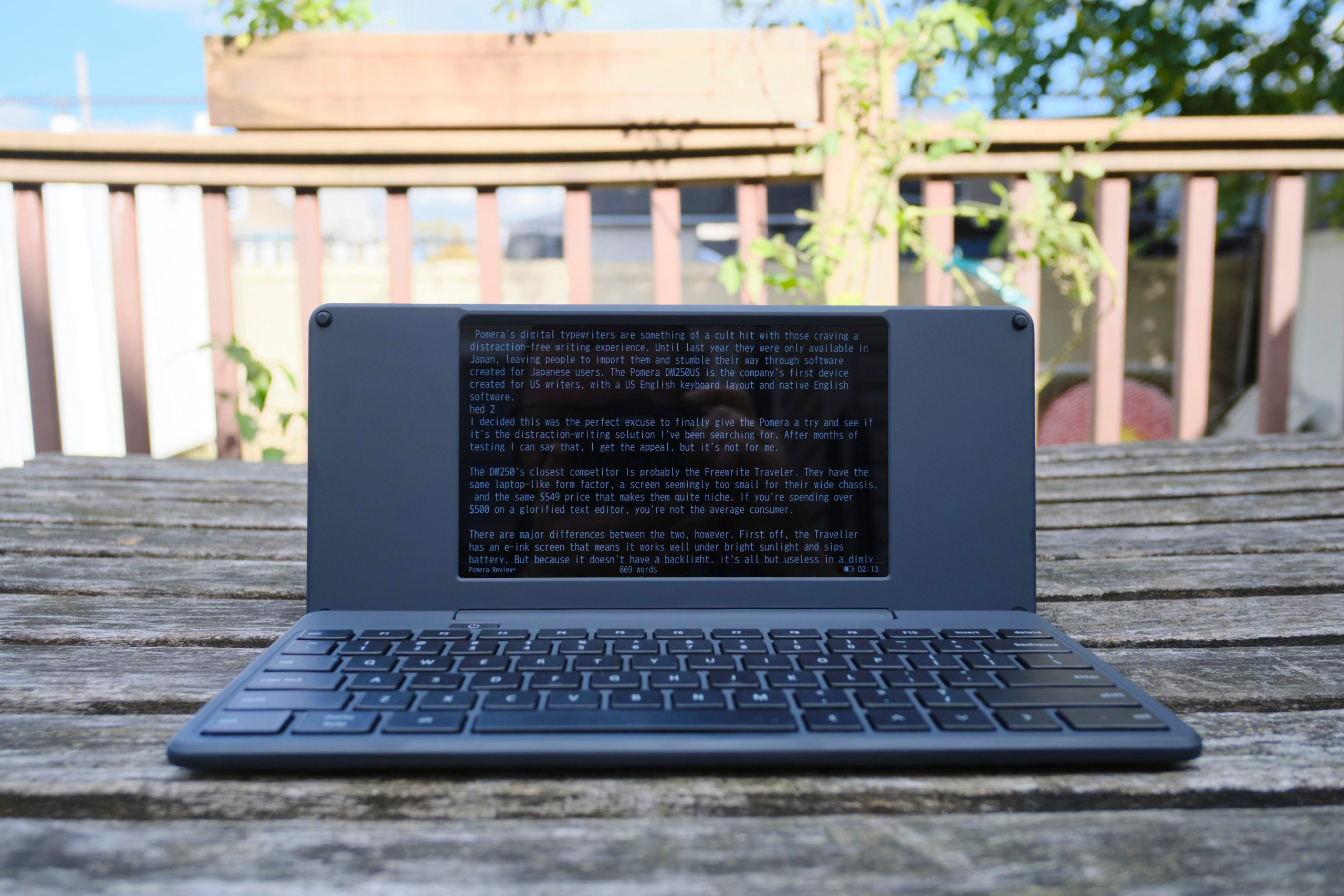
ReviewGadgetsTechReviewsPomera’s sleek distraction-free writing machine is just too smallThe first of Pomera’s digital typewriters to reach the US has its charm, but it’s too uncomfortable for long typing sessions.by Terrence O’BrienNov 9, 2026, 2:00 PM UTCShareGift Photo: Terrence O’Brien / The VergeTerrence O’Brien is the Verge’s weekend editor. He’s covered the tech industry for over 18 years and knows a thing or two about synths.Pomera’s digital typewriters are a cult hit with those craving a distraction-free writing experience. Dedicated word processor devices never caught on in the US the way they did in Japan. And the ones available in the US, like the AlphaSmart Neo, just weren’t as sleek and portable as the tiny foldable devices from Pomera.Until last year, Pomera devices were only available in Japan, leaving people to import them and stumble their way through software created for Japanese users.
The $549 Pomera DM250US is the company’s first device created for US writers, with a US English keyboard layout and native English software. For those of us who want someplace to write where the temptation of Bluesky isn’t a click away and there’s no danger of disappearing down a Wikipedia rabbit hole, it was an exciting development.After months of testing, I can say that I get the appeal, but it’s not for me. The tradeoffs it makes to cram so much into such a portable device make it a literal pain to use for its intended purpose.6Verge ScorePomera DM250US$549$549The GoodExtremely portableExcellent battery lifeRobust editing toolsThe BadPainfully cramped keyboardClunky syncingPricey$549 at PomeraHow we rate and review productsThe DM250 is undeniably the sleekest distraction-free writing device I’ve come across. It’s a wide clamshell, with a serious-looking matte black finish and a 7-inch LCD screen that seems too small for its chassis.
Its extremely compact size —10.3 inches wide, 4.7 inches deep, and 0.7 inches thick — means I can toss it in my tiny Uniqlo crossbody bag with room to spare for my Kobo, my iPod, two sets of headphones (wired and Bluetooth), plus a Field Notes and a pen.Its closest competitor is probably the Freewrite Traveler, which has a similar laptop-like form factor and price. The Traveler is larger in every direction, at 11.3 inches by 5 inches by 1 inch, and its glossy plastic feels cheap in comparison to the Pomera. The Traveler also opts for a crisp E Ink screen that sips battery life, but is also completely useless in a dimly lit room.Pomera’s battery life is pretty solid, though. It’s rated for 24 hours of continuous use.
At least anecdotally, that seems to check out. I’ve been using Pomera sporadically for a little over three months now and have only had to charge it once. I last charged it in mid-September, and it’s still sitting at about 50 percent battery life.The Pomera is quite thin and portable. Photo: Terrence O’Brien / The VergeThe software on the Pomera is also relatively complex for a distraction-free writing device.
It has tons of options for customizing the interface, a basic calendar, and even spell check. I really like the calendar app. Each date has a text file associated with it that’s displayed in a sidebar. It’s easy to open quickly and add appointments, notes, or journal entries without closing the main document you’re working on.
It’s the kind of perfect less-is-more tool that stays out of the way yet is incredibly flexible.RelatedBYOK is my new go-to distraction-free writing toolThe Freewrite Traveler is a retro word processor that’s fatally ahead of its timePomera also does have some welcome options for tweaking the interface. By default, it’s black text on a white screen, but you can invert that, which I found far more comfortable for long stretches of writing. There is a small status bar at the bottom that shows the file name, word count, battery level, and time, which you can hide by switching to full-screen mode. You can have ruled lines or even put a frame around your text to limit it to a particular part of the screen.Pomera’s editing tools are far more robust than its competitors, which tend to be no-frills plain text.
You can place markers in your files and build an outline, insert a timestamp, or find and replace strings of text. You can insert templates, compare two files side by side, or even open the same file twice if you need to check multiple parts of a document at once.The tiny keyboard squeezes in a full set of function keys. Photo: Terrence O’Brien / The VergeStill, the Pomera just never clicked for me. That’s partly a software issue.
The interface for writing on the device is thoughtful and feature-rich, but the two wireless syncing options are painful to use. The first is a finicky system for emailing work to yourself: You have to log in to a Gmail account and connect it to the Pomera to send text, which shows up in the body of the email, not as an attachment. (If you don’t have a Gmail account, you actually have to manually enter your SMTP info.) The other option is the convoluted Pomera Link mobile app. To use the app, you have to go to the menu on the Pomera itself and select QR code. Then you open the app and scan the code, which imports the text to your phone.
But you can’t simply save it from there. Instead, you have to copy and paste the text into another app, like Google Docs, if you want to save it. It’s a mess.Thankfully, if you’ve got a USB-C cable, you can get your text off it by plugging your Pomera into a computer and transferring it like you would with any USB drive. The Pomera has a little over 1GB of built-in storage, which should be more than enough for most people — that will store hundreds of thousands of pages of plain text.
But it also has an SD card slot if you’d prefer the convenience of storing your manuscripts there for easily moving between devices.A USB-C port and SD card slot can be found on the left side. Photo: Terrence O’Brien / The VergeBut in the end, it wasn’t the Pomera’s software that sank it for me. Its keyboard is just too small.The size difference between the Traveler and the DM250US might seem negligible, but it’s painfully obvious the second you start typing. The Traveler features a full-size scissor-switch keyboard with a simplified design that ditches the function and arrow keys.
Meanwhile, working with less space, Pomera squeezes in a full set of function keys and cursor keys.In small bursts, the keyboard isn’t terrible. I won’t be writing any odes to its keys’ shallow yet satisfying action, but I’ve definitely used worse. The thing is, my hands start to cramp, and my wrists hurt pretty quickly. My hands are not particularly large, but the layout and tiny keys are an absolute nightmare for my carpal tunnel.
I wrote this review on the Pomera and had to take breaks every 300 words or so because it was just too uncomfortable to keep going for much longer, and its small size meant I also made a lot more typos than usual. If you’ve got particularly small hands it might not be as much of an issue.The utilitarian look gives Pomera a more premium vibe than many of its competitors. Photo: Terrence O’Brien / The VergeDon’t get fooled by the “Bluetooth keyboard” option in the menu — it doesn’t mean you can connect an external keyboard to the Pomera. Instead, this allows you to use the Pomera as a keyboard with other devices, which I guess could be helpful in a pinch.
If you were going to use a Bluetooth keyboard anyway, it might be worth looking into BYOK, which, as the name implies, lets you bring your keyboard. It’s quite a bit cheaper than the Pomera, even if its editing features are less robust.If portability was my number one priority, and I didn’t want to resort to some clunky folding keyboard, the Pomera would fit the bill. It feels sturdier and more premium than its most obvious competitor, the Traveler, and as much as I lik










Leave a Reply