
Text settings Story text Size Small Standard Large Width * Standard Wide Links Standard Orange * Subscribers only Learn more Minimize to nav This spring, Apple made it official: The Mac Pro is dead. When Apple was using Intel processors and AMD GPUs, the idea of an expandable and upgradeable tower made sense. But Apple Silicon chips bring the CPU, GPU, and memory interface all under one roof in a way that makes that sort of upgradeability not just superfluous but impossible. At least not without breaking some of the chips’ key benefits.
And as it happens, Apple Silicon’s combination of a fast CPU, solid GPU, and unified memory architecture has made it a good fit for a modern “pro” workload that really pushes high-end hardware: running language models and agents locally. That’s really the core audience for the M5 Ultra Mac Studio, Apple’s tippity-top config that is jumping two processor generations in a single refresh (there was no M4 Ultra, if you recall). The highest-end Studios have always felt like a bit of overkill for most people, but now there’s a particular kind of AI-pilled coder or designer who can legitimately benefit from having this kind of system on their desk. Apple was caught off guard by the demand for these systems from people running software like OpenClaw and running open-weight models locally, which, along with the AI-fueled memory shortage, is why it has been nearly impossible to buy most of these systems for months.
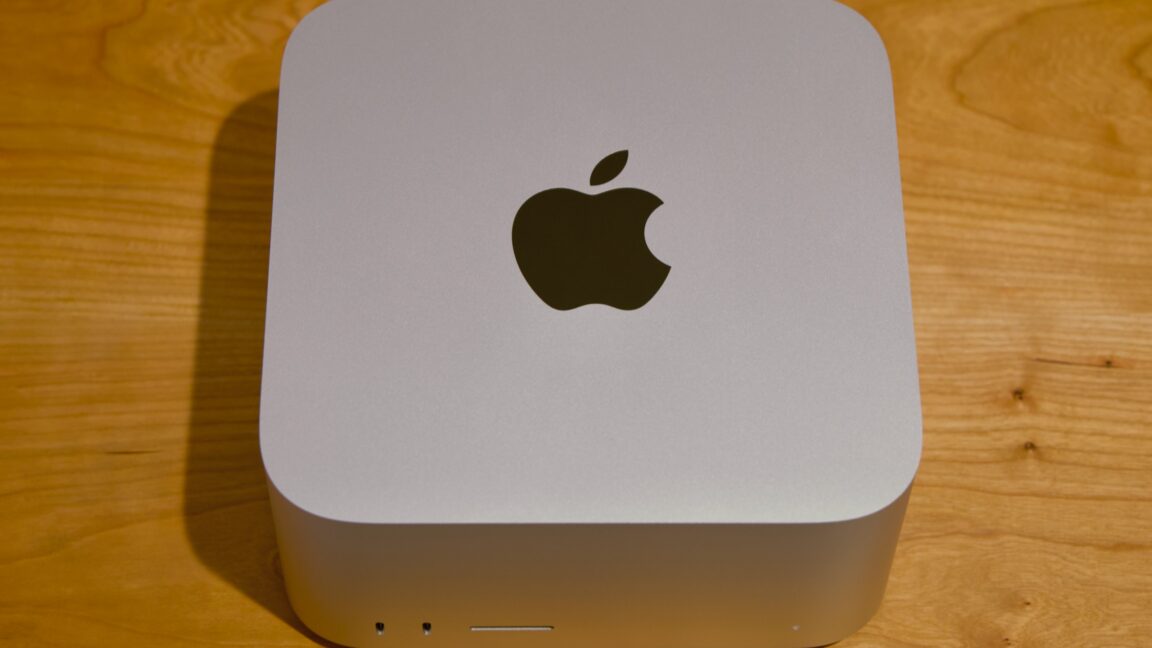
That’s the context that the new Mac Studio is launching into. Same design, new hardware Same design language as the Mac mini, but less mini. Andrew Cunningham Same design language as the Mac mini, but less mini. Andrew Cunningham The Studio has more I/O for pros who want to hook up a bunch of stuff.
Andrew Cunningham The Studio has more I/O for pros who want to hook up a bunch of stuff. Andrew Cunningham Ports, from left to right: four Thunderbolt 5, one 10 gigabit Ethernet, two 5 Gbps USB-A, one HDMI 2.1, and a headphone jack. The front ports are 10 Gbps USB-C on the Max and Thunderbolt 5 on the Ultra. Andrew Cunningham Ports, from left to right: four Thunderbolt 5, one 10 gigabit Ethernet, two 5 Gbps USB-A, one HDMI 2.1, and a headphone jack.
The front ports are 10 Gbps USB-C on the Max and Thunderbolt 5 on the Ultra. Andrew Cunningham The Studio has more I/O for pros who want to hook up a bunch of stuff. Andrew Cunningham Ports, from left to right: four Thunderbolt 5, one 10 gigabit Ethernet, two 5 Gbps USB-A, one HDMI 2.1, and a headphone jack. The front ports are 10 Gbps USB-C on the Max and Thunderbolt 5 on the Ultra.
Andrew Cunningham The new Mac Studio looks the same as it did when it launched with the M1 Max and M1 Ultra back in 2022. It’s a small, squat box, with the same 7.7-by-7.7-inch footprint as the old Mac mini, but it’s taller. Both the Max and Ultra variants of the Studio look the same, but the M5 Ultra version weighs two pounds more because it has heavier but more-conductive copper in its heatsink to help cool the more powerful chip. Both Studio models also come with nearly all the same ports.
On the back, you’ll find four 120Gbps Thunderbolt 5 ports, a 10Gbps Ethernet port, an HDMI 2.1 port, and a pair of 5Gbps USB-A ports. On the front, both Studios have a UHS-II SD card reader, but the Max comes with two 10Gbps USB-C ports, and the Ultra comes with two more 120Gbps Thunderbolt 5 ports. The Ultra’s additional oomph extends to external display support. The M5 Max supports up to five external displays, and the M5 Ultra supports up to eight, though both come with caveats depending on the resolution and refresh rates you’re using.
Display support details for the M5 Max and M5 Ultra Mac Studios. Credit: Apple Display support details for the M5 Max and M5 Ultra Mac Studios. Credit: Apple The M5 Max is a known quantity at this point, and Apple has been shipping it since March in the MacBook Pro. It improved over the last-generation M4 Max by introducing new “super” cores for the CPU and nudging the maximum memory bandwidth up from 546GB/s to 614GB/s.
The number of GPU cores stayed the same (40), but new neural accelerators built into each GPU core helped improve its performance for ML/AI-assisted technologies like MetalFX upscaling and frame generation. The M5 Ultra is a bigger departure for a few reasons. The first is that there was no M4 Ultra, so we’re effectively hopping two processor generations despite only jumping a single product generation. CPU S/P/E-cores GPU cores RAM options Memory bandwidth Apple M5 Ultra (low) 10S/20P 64 96GB/256GB 1,228.8GB/s Apple M5 Ultra (high) 12S/24P 80 96/256GB/512GB (planned) 1,228.8GB/s Apple M3 Ultra (high) 24P/8E 80 128GB/256GB/512GB 819.2GB/s Apple M2 Ultra (high) 16P/8E 76 Up to 192GB 819.2GB/s Apple M1 Ultra (high) 16P/4E 32 Up to 128GB 819.2GB/s The second is that the way the chip is built has actually changed quite a bit.
The M1 Ultra, M2 Ultra, and M3 Ultra were all essentially a pair of Max chips strapped together using a high-speed interconnect to get most of the benefits of making one huge chip without all of the manufacturing difficulties of making one huge chip. The M5 Ultra is still basically a pair of M5 Max chips stitched together; that much is the same. The chip includes up to 12 super CPU cores, up to 24 P-cores, up to 80 GPU cores, 32 Neural Engine cores, two video decoding engines and four encoding engines, and a little over 1.2TB/s (yes, that’s TB with a T) of memory bandwidth. That’s a neat doubling of all the M5 Max’s major specs.
What’s different is that this generation’s M5 Pro and M5 Max are both already a pair of chiplets attached together via silicon interconnect, which means the M5 Ultra is actually four distinct bits of silicon packaged together. The potential downside for this arrangement is that die-to-die interconnects often can’t communicate quite as fast as components all housed on the same silicon. Overall, the Fusion Architecture hasn’t kept previous Ultra chips from being fast, and it doesn’t keep the M5 Ultra from being fast, either. But performance on the Ultra chips has never scaled perfectly linearly with the number of cores, and the M5 Ultra is the same way.
Also: New prices 🙁 If you forget what the computer is called, look at the bottom. Credit: Andrew Cunningham If you forget what the computer is called, look at the bottom. Credit: Andrew Cunningham Normally we could just cover the hardware improvements in a new Mac while assuming that all else was equal on the pricing front—that the new hardware would automatically be a better deal than the old hardware because it was being sold for the same price. But Apple has raised prices across the board this year because of the ongoing AI-fueled memory crunch.
As its highest-end computer with its highest-end memory and storage configurations, the Mac Studio is getting hit even harder than other Macs. At its introduction, the basic M4 Max Mac Studio ran $1,999, which got you a slightly cut-down version of the chip, 36GB of RAM, and 512GB of storage. The M5 Max Studio starts at $2,499, a $500 increase. An M3 Ultra Mac Studio with a cut-down chip, 96GB of RAM, and 1TB of storage started at $3,999; the same M5 Ultra config will run you a whopping $5,499, a $1,500 increase.
And that’s for the base models. Going for a fully enabled M5 Max, 64GB of RAM, and 1TB of storage—what I’d call the price/performance sweet spot for dabbling with local AI—will run you $3,799, $900 more than the M4 Max Studio would have cost when it launched. As for the Ultra? A 256GB RAM/1TB storage model that would have cost $5,599 18 months ago now costs $9,499—not quite twice the price but close enough to feel like it.
There will be a 512GB version of the M5 Ultra Studio, but Apple hasn’t said what it will cost. The M3 Ultra version started at $9,499, so I feel pretty confident in saying that the M5 Ultra version will be a











Leave a Reply