
TechGadgetsDellThe Dell XPS 13 is the first real competitor to the MacBook NeoEven the base XPS 13 is an excellent laptop. But you’re still gonna want the 16GB model.If you buy something from a Verge link, Vox Media may earn a commission. See our ethics statement.by Antonio G. Di BenedettoSep 14, 2026, 5:00 PM UTCShareGiftIf you buy something from a Verge link, Vox Media may earn a commission.
See our ethics statement.Welcome back. | Photo: Antonio G. Di Benedetto / The VergePart OfThe Neo Effect: How Apple’s cheapest Mac is changing the PC gamesee all updates Antonio G. Di Benedetto is a reviewer covering laptops and the occasional gadget. He spent over 15 years in the photography industry before joining The Verge as a deals writer in 2021.Dell’s last XPS 13 was meant to be a farewell before the company sunset the entire XPS brand.
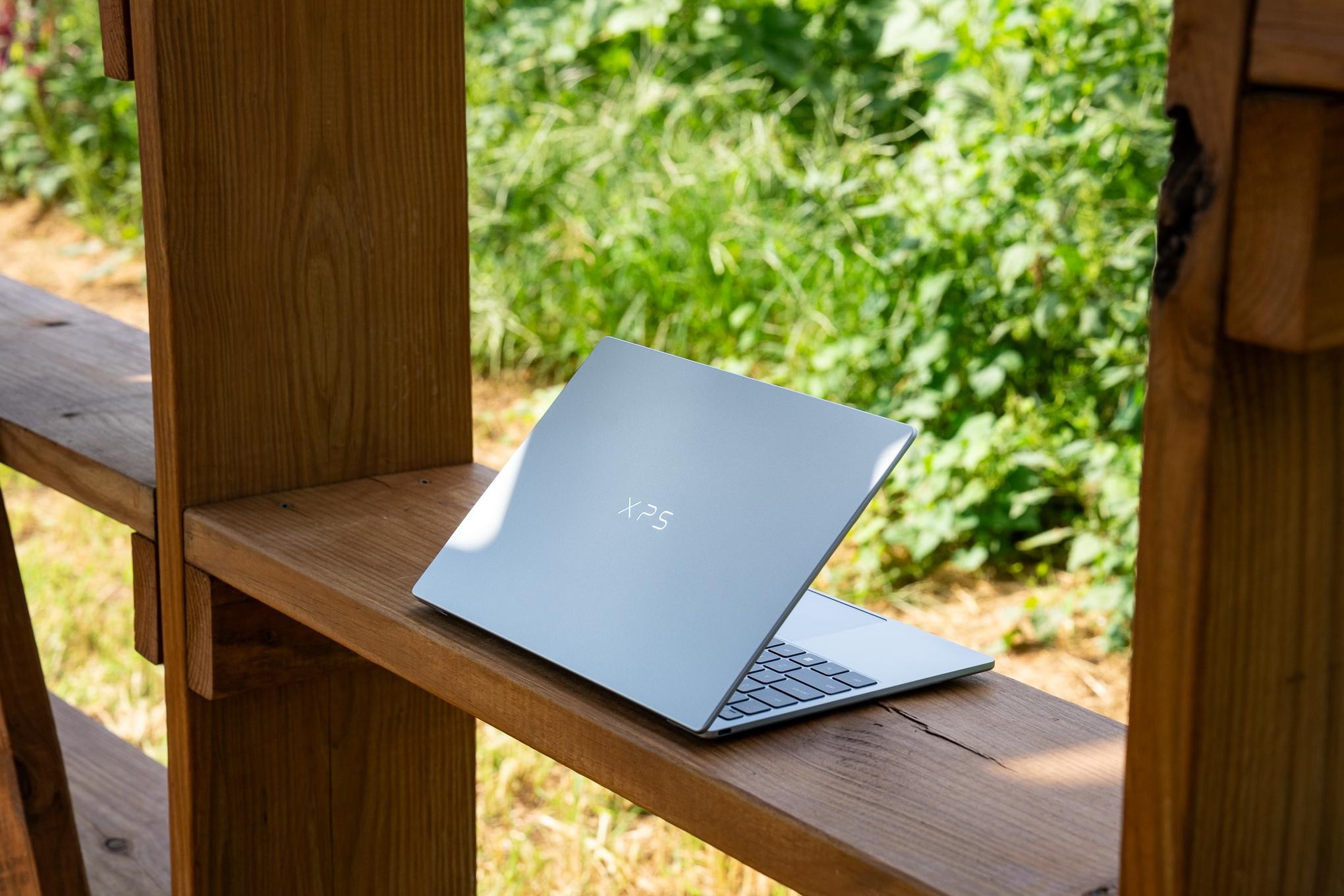
But it was a bitter ending, and an overpriced one as well. Earlier this year, Dell resurrected the XPS name with the excellent (and very expensive) XPS 14 and 16. And now, it’s reinvented the XPS 13 as a much more affordable thin-and-light to take on the MacBook Neo.Call it another comeback.The 2026 XPS 13 has the nicest hardware you’ll find in a new $700 laptop outside of Apple’s Neo. The core components — the screen, keyboard, trackpad, and speakers — are all great or excellent.
It’s an exquisite package in a sleek and very thin ultra-portable.And unlike other Windows 11 laptops that struggled to get by with 8GB of RAM, the XPS 13 feels competent even with that limited memory allocation. But even though it’s great that there’s an 8GB Windows laptop in 2026 that’s not dead on arrival, you’re still going to want the 16GB version (which I’ve also been testing) for $1,000. And sadly, no configuration of the XPS 13 includes a headphone jack.8Verge ScoreDell XPS 13 (2026)$700$700The GoodImpressive build quality in a super thin chassisGreat screen, keyboard, and trackpadFast SSDThe Bad8GB of RAM still feels risky for long-term Windows performanceNo headphone jack (seriously, why?)Often gets warm on your lap$700 at Dell (8GB / 256GB)$700 at Best Buy (8GB / 512GB)$850 at Best Buy (16GB / 512GB)How we rate and review productsI’ve been testing two XPS 13 configurations with the same six-core Intel Core 5 320 “Wildcat Lake” processor and 512GB SSD. Their singular difference is memory: The base $799.99 model has 8GB of RAM and the $999.99 one has 16GB.
I’ve been working off this pair quite a bit for a couple weeks, and the hardware is brilliant. When I got them, that 8GB / 512GB configuration was the base model and cost $699.99. But in early September, Dell created a new $699.99 base model with just 256GB of storage, and raised the price of the 512GB models by $100 each. Sadly these kinds of pricing shenanigans are commonplace in our ongoing RAMageddon nightmare.Screen: AWebcam: AKeyboard: BTrackpad: BPort selection: DSpeakers: BNumber of ugly stickers to remove: 1The XPS 13 is the nicest-looking and -feeling Windows laptop you’re going to find at this price.
It’s just as sleek as a MacBook Neo or Air, and at 2.2 pounds / 1kg and 0.5 inches / 12.7mm thick, it’s lighter than the Air and almost as thin. The XPS is an exquisite laptop to hold, and it practically disappears into a bag. The screen has much thinner bezels than a Neo, and it’s equally bright and colorful — but with 120Hz refresh and touch support rather than the Neo’s 60Hz non-touch screen. It even has an anti-glare finish the Neo doesn’t offer.The speakers sound surprisingly good for such a compact laptop, offering a well-rounded sound that gets plenty loud.
The mechanical trackpad is small, even shorter than the Neo’s, but its only major downside is that it doesn’t physically click in all four corners. Even the webcam impressed me, rendering very good color and handling poor light or backlighting just fine. And the keyboard? Somebody tell Dell’s designers to put this nice tactile chiclet-style keyboard on everything and give up on that latticeless look on other XPS laptops.PreviousNext1/8A well-put-together, travel-friendly package.Battery life and thermals aren’t amazing, but they’re adequate.
The bottom chassis frequently warms your lap, with its hottest point reaching as high as 104 degrees Fahrenheit / 40 degrees Celsius, but the keyboard deck stays cool. As for the battery, it typically got me seven hours of continuous mixed usage (lots of Chrome tabs, a few video calls, and streaming a few albums with the screen on most of the time) or up to 10 hours during a much lighter meeting-free day. I’d usually prefer a thicker laptop for the sake of more battery, but I’ve been smitten enough by the XPS’s small and light frame to feel this is passable — even though the Neo lasts several hours longer on an even lower-capacity battery.RelatedMacBook Neo review: the Mac for the massesIs this $450 laptop from an unknown brand too good to be true?Even Microsoft couldn’t make Windows 11 work well on 8GB of RAMThe XPS 13 has two 10Gbps USB-C 3.2 Gen 2 ports, one on either side, and both support charging and video-out. But why, oh why, does this laptop not have a headphone jack?
Even if you rarely use 3.5mm audio it’s nice to have as a fallback option.As for raw performance, both versions of the XPS 13 fall well behind the MacBook Neo’s A18 Pro in synthetic benchmark tests like Geekbench, though the 16GB model is significantly closer in our Premiere 4K export test. And the XPS’s six-core Wildcat Lake chip is night-and-day better than the five-core version found in the Chuwi UniBook, which took over an hour to export. The extra performance core and extra GPU core in the XPS 13 make a notable difference, and so does its speedy storage. The XPS 13’s SSD read speed is nearly three times as fast as the Chuwi, and nearly four times as fast as the Neo.Dell XPS 13 (2026) / Intel Core 5 320 “Wildcat Lake” / 8GB / 512GBDell XPS 13 (2026) / Intel Core 5 320 “Wildcat Lake” / 16GB / 512GBMacBook Neo / Apple A18 Pro / 8GB / 256GBChuwi UniBook / Intel Core 3 304 “Wildcat Lake” / 8GB / 256GBHP OmniBook 3 16 / Qualcomm Snapdragon X X1-26-100 / 16GB / 512GBMicrosoft Surface Laptop 13-inch (2026) / Qualcomm Snapdragon X Plus X1P-46-100 / 8GB / 256GBAcer Aspire 14 AI / Intel Core Ultra 7 256V / 16GB / 1TBLenovo IdeaPad Slim 3x / Qualcomm Snapdragon X X1-26-100 / 16GB / 256GBCPU cores66658888GPUIntel Graphics (2 GPU cores)Intel Graphics (2 GPU cores)A18 Pro (5 GPU cores)Intel Graphics (1 GPU core)Adreno X1-45Adreno X1-45Intel Arc 140V (8 GPU cores)Adreno X1-45Geekbench 6 CPU Single21222581340223852142234827692137Geekbench 6 CPU Multi6826761585086187105939421109309728Geekbench 6 GPU (OpenCL)117341287519798601995779554285569689Premiere 4K Export (lower is better)27 minutes, 14 seconds9 minutes, 54 seconds8 minutes, 30 seconds1 hour, 9 minutes, 29 seconds12 minutes, 8 secondsCrashed7 minutes, 28 seconds12 minutes, 59 secondsSustained SSD reads (MB/s)6855.506593.311735.912394.575017.123804.316391.515738.86Sustained SSD writes (MB/s)5141.765519.661684.052092.664370.353310.945524.222801.02Price as tested$799.99$999.99$699$449$517$949.99$1,049.99$749.99In day-to-day use of the XPS 13, 8GB of RAM actually feels passable, unlike with the Chuwi and recent Surface Laptop 13-inch.
I have used it without any major failings or crashes, and it’s mostly gotten by okay when all I ask of it is simple web-based stuff. But having only 8GB of memory does occasionally slow you down while multitasking. For example, with a dozen or more Chrome tabs open on it I occasionally had to wait for my tabs to reload when I switched back and forth between them. That’s a normal Chrome feature to save memory, but it happens a lot on the 8GB XPS 13.
And when I was bouncing between a couple dozen Chrome tabs and messaging colleagues on Slack — not an unusual workload — even tabs I had used just minutes before got dumped from memory and needed











Leave a Reply